Clojure is a language running on the Java Virtual machine and gaining rapid popularity. Beeing a general-purpose language supporting interactive development that encourages a functional programming style, and simplifying multithreaded programming its usage is particularly promising in high concurrency/throughput environments. weiterlesen
Monat: Juli 2010
Java2D Conical Gradient Paint
Just a short blogpost about a little tool that i would like to share with you…
A few months ago i was creating a worldclock with a night and day display where i needed a conical gradient.
So what is a conical gradient ? Here we go… weiterlesen
JUG Stammtisch am 21.7.
Am Mittwoch dem 21.7. gibt es wieder den offenen Stammtisch der JUG Muenster!
Hinweis: Wir haben eine neue Mailingliste, wer per E-Mail auf dem Laufenden gehalten werden möchte, kann sich mit einer E-Mail an [email protected] eintragen. weiterlesen
Android AutoConversion EditText component
AutoConversion EditText component:
Yesterday i created a Java Swing textfield component that autoconverts a given value into a selectable unit which could be useful.
In the evening i got the idea to port this component to Android and see if it will work there.
Just as a short note…if you are a Java developer you should take a look into Android…it’s sooooo nice, porting the component tooks me not more than 2 hours (and i’m not really into Android development).
Here is the result:
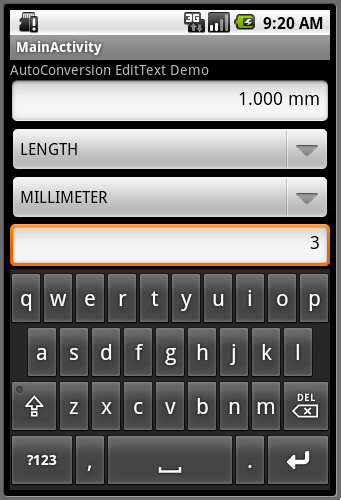
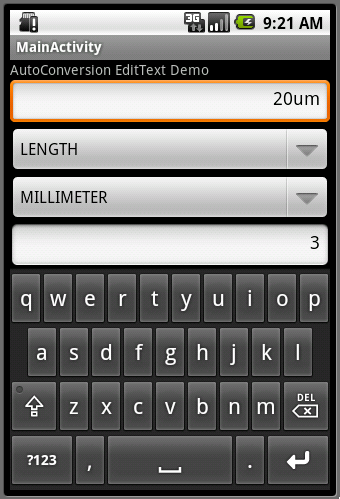
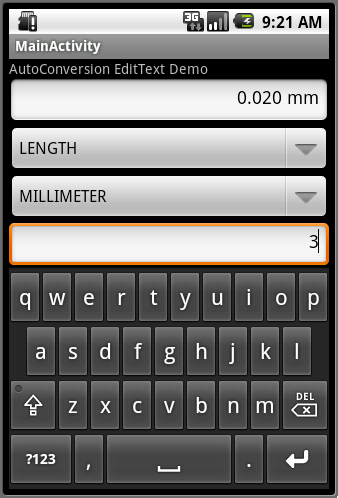
So you could type in a value with the unit of your choice and after leaving the field the value will be converted into the EditText „base unit“.
I changed the units with special characters like µ, Å, ² and ³ to u, A, 2 and 3 which leads to units like:
um <=> µm
A <=> Å
m2 <=> m²
m3 <=> m³
and so on…
The upper spinner will select the type of unit you would like to use.
The middle spinner will select the current base unit for the textfield.
The lower spinner will adjust the number of decimals for the textfield.
Because it displays the unit directly in the textfield there’s no need for a additional label for the unit.
You also might check this little video
Well again this is nothing very fancy or gui related but it was a nice challange for me so i decided to share it with you… AutoConversionField.zip
follow me on twitter if you like…
Java AutoConversion textfield component
AutoConversion textfield component:
If you drive a motorized stage of a microscope you often have to handle coordinates in a unit like millimeter [mm]. But it might happen that the sample in your microscope is only in the range of microns [µm].
So would it not be nice to directly type in the coordinates in µm and the textfield would automaticaly convert the unit into [mm] ?
This would increase the workflow a lot because you do not have to think about conversion of units. There seems to be countries that are using inches and people living there might like to type in coordinates in inches instead of millimeters..etc…
For this reason i created a little component that extends a standard javax.swing.JTextField and is now able to do the conversion. You could also use the conversion alone without the textfield to create some kind of unit converter…it’s up to you.
Here are a few screenshots of a demo app that uses the component:
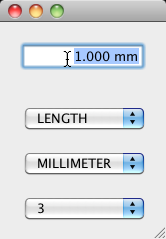
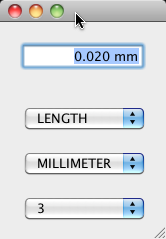
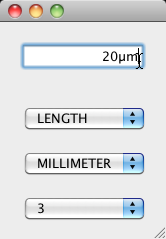
So you could type in a value with the unit of your choice and after leaving the field or pressing enter the value will be converted into the textfields „base unit“.
The upper combobox will select the type of unit you would like to use (it supports angle, area, length, mass, temperature, time at the moment but one could easily add more units to it).
The middle combobox will select the current base unit for the textfield.
The lower combobox will adjust the number of decimals for the textfield.
Because it displays the unit directly in the textfield there’s no need for a additional label for the unit.
You also might check this little video
Well this is nothing very fancy or gui related but it was very useful for me so i decided to share it with you… ConversionField.zip
follow me on twitter if you like…