Posts Tagged ‘swing’

Swing Worldclock

Donnerstag, Februar 18th, 2010

During my trip to JFokus conference last month i was waiting for the train on a german trainstation.
Because i started working on a little swing tool (i will blog about it later) for our usergroup i was in the need for a analog clock.
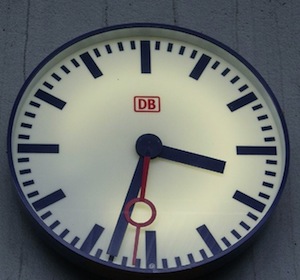
So the german railway company “Deutsche Bahn” has a famous analog clock on nearly every german trainstation which looks like this:

DB_Clock.jpg

» More: Swing Worldclock


Drawing in code (Part 2)

Donnerstag, Januar 28th, 2010

Drawing in code:

Part 2 (Transfer the prototype into swing):

So you will find out that this is not magic but only drawing the same elements that we used in the vector drawing programm but now in their Java2D representations. We just create a buffered image with the same size as the prototype. So we could use the same pixelcoordinates for the shapes and gradients in swing.
» More: Drawing in code (Part 2)


Drawing in code (Part 1)

Donnerstag, Januar 28th, 2010

Drawing in code:

Part 1 (Drawing the prototype):

After i published my little fun swing nixieclock i got a lot of requests on how i transferred the image into swing.
Because i remember when i was starting swing development i asked myself the same questions when i saw the amazing work of swing/design guru’s like Kirill Grouchnikov, Romain Guy, Joshua Marinacci, Chet Haase, and others.
Well in the meantime i figured out how to do this and find a workflow that i would like to share here. By the way this is really nothing compared to the things these swing/design guru’s are able to do.

So here we go, first of all i have one good advice for you “Know your tools”,
which means not only java and swing but also your graphics program.

So i’m using Adobe Fireworks for that but you could also use any other kind of graphics program like Adobe Photoshop, Gimp, Inkscape etc.

I will start the tutorial with the drawing of the tube in Adobe Fireworks because it makes coding in swing so much easier if you know how to draw it in a graphics program. So the first part will be focussed on the drawing and the second part will explain how to draw all the different points in java2d/swing: » More: Drawing in code (Part 1)


Swing Apollo space program mission timer

Samstag, Januar 2nd, 2010

Still on vacation i took the chance to spent some time on watching movies i ordered some time ago and so i watched several movies related to the Nasa moon landing program which lead to the landing on the moon in july 20th 1969.
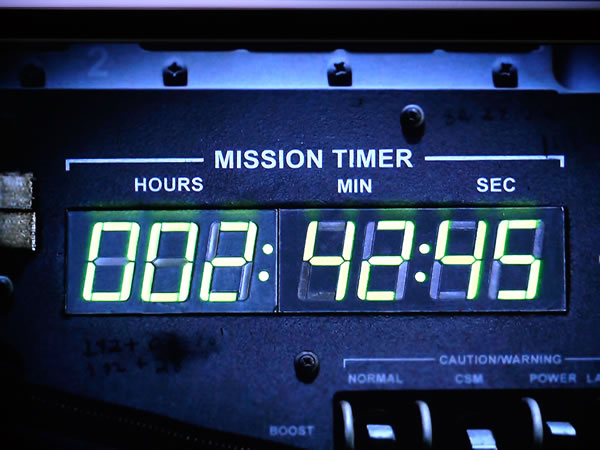
In the movie MoonShot which tells the story of Apollo 11 and it’s flight to the moon in 1969 i was fascinated by the board computer of the command module and took a picture of the mission timer which looked great to me…

MissionTimerOriginal.jpg

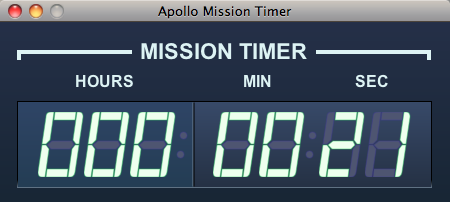
Because i love coding in Java and those things could be easily done in Java’s swing framework i decided to create a little mission timer by myself and that’s a picture of the result

MissionTimerJava.png


I don’t know if it’s useful to anybody but for those of you who like it, i added the source as netbeans project here MissionTimer.zip

You will find two classes in the project, a JFrame and a TimerPanel. (If you would like to use the TimerPanel in another project you just can drag’n drop the TimerPanel class onto a JFrame, JPanel etc.)

To start or stop the timer you just have to click on the panel with the left mousebutton. To reset the panel just doubleclick on the panel.

Enjoy it and keep swinging…


Custom swing component

Montag, Dezember 21st, 2009

During my vacation i’m playing around with the SunSPOT’s from Sun Microsystems which are fantastic little gadgets. (Please find more information about them here.)
I attached a combined temperature/humidity sensor to one of my spots and used xmpp protocol (with smack library) to communicate with my SunSPOT host application from wherever I am.
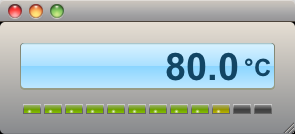
To visualize the measured values I needed something sexy and because there was nothing ready to go I created two little “instruments” that I would like to share with you.

And here they are:

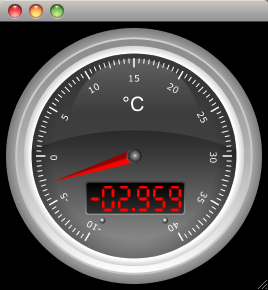
First a gauge:

ishot-2.png

Second Java Swing component is a display (yes I know it’s inspired by Apples iTunes):

ishot-1.png

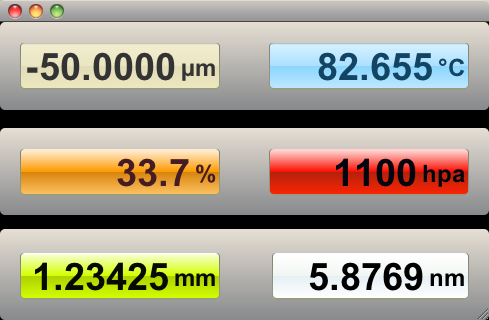
Third custom Swing component a combination of the display with a led panel:

ishot-3.png

I think I’ll have to do some work at the 3d-effect of the rounded rectangle but as a first prototype they looked ok to me.

You can find my presentation on custom Swing components here, the Netbeans project for the components in the article can be downloaded here: Instruments, the Netbeans project for the application from the slides is here: SD.zip

If you are interested, please leave a comment…


Swing Workshop

Mittwoch, November 25th, 2009

Am Samstag dem 28.11.2009 findet ein Workshop zum Swing Talklet vom 03.11.2009 statt.

Uhrzeit: 14:00 bis 18:00 Uhr.
Ort: Hörsaal Leo 18, Leonardocampus, Am Johann-Krane-Weg zwischen der Eishalle und dem Technologiepark (http://tinyurl.com/jugmsleo18)

Inhalt:
Da Swing ein sehr umfangreiches Framework ist, kann im Workshop lediglich ein kleiner Auschnitt
behandelt werden.
Es wird gezeigt, wie man in Swing einen Button so umgestalten kann, daß er dem aktuellen JavaFX
Design (“Caspian”) entspricht. Der Workshop soll hierbei nicht als Votrag im üblichen Sinne dienen, sondern als Hands-On Session, was bedeutet, daß jeder einen Rechner mitbringen sollte.
Dabei wäre es sinnvoll mindestens Java 6 Update 10 installiert zu haben, wobei sich das Beispiel auch
unter Java 5 noch verwenden läßt.
Der Workshop soll dazu dienen in die Funktionalität von Swing reinzuschnuppern, wobei der Schwerpunkt hier auf customized components liegt und nicht auf Swing Grundlagen.
Natürlich stehen wir auch bei “Anfänger-Fragen” jederzeit mit Rat und Tat zur Seite, soweit wir die
Antwort wissen ;-)

Voraussetzungen:
- Computer mit entsprechendem JDK
- Entwicklungsumgebung (demonstriert wird auf Netbeans)
- Grundlagen Java
- Spaß am Coden…

Jeder an Desktop Java Interessierte ist herzlich dazu eingeladen teilzunehmen…


SwingDemo Projekt

Dienstag, November 3rd, 2009

In Ergänzung zum Talklet “Swing and you’re winning” der JUG Münster vom 03.11.2009 finden alle Interessierten hier die Applikation als Java Webstart Version. Der Talk soll die Möglichkeiten vermitteln, welche Swing zur Verfügung stellt vor allem im Hinblick auf sog. “custom components”.
Für die SwingDemo wird auf jeden Fall Java 6 benötigt.

jws_launch.gif

SwingDemo

Desweiteren stehen Euch hier die kompletten Quellen als Netbeans Projekt zum Download zur Verfügung.

Es soll noch ein Workshop zu dem Talk folgen, bei welchem dann mit den bestehenden Quellen ein wenig rumgespielt werden soll. Der Termin hierzu wird noch auf http://www.jug-muenster.de bekannt gegeben.

Viel Spaß beim coden…


Talklets Münster: Swing – JUnit & Hudson

Donnerstag, Oktober 22nd, 2009

Am Dienstag dem 03.11.2009 finden im Hörsaal Leo18 auf dem Leonardocampus (am Johann-Krane-Weg zwischen der Eishalle und dem Technologiepark http://tinyurl.com/jugmsleo18) die ersten zwei Vorträge in unserer neuen Vortragsreihe “Talklets Münster” statt.

Die Vorträge » More: Talklets Münster: Swing – JUnit & Hudson